Clients, roles and consent
Who may ask for what is content in the configuration, never code. Three things decide the scope an app gets, and the narrowest wins:
- the client’s ceiling, the scopes its
[[ferrosmart.client]]table lists; - the roles the person holds at the identity provider, each mapped by a
[[ferrosmart.role]]table to theuser/andpatient/scopes it allows; - the consent the person gives on FerroSMART’s consent page.
SMART lets the granted scope differ from the request and has the server’s
policy win (SMART App Launch 2.2.0, Obtain access token, Response; Scopes
and Launch Context, SMART’s scopes are used to delegate access). The token
response’s scope always says what was granted. The resource server still
applies its own rules on top.
The client registry
Each [[ferrosmart.client]] table registers one client. FerroSMART writes
the tables to its database at start, so every replica sees the same
registry. The configuration seeds the registry; the
admin API changes it while FerroSMART runs, and a client it
changed is no longer written from its table.
| Key | What it is |
|---|---|
client_id | The client’s id, as the app sends it |
name | The name the consent page shows the person |
kind | public, confidential_symmetric or confidential_asymmetric |
jwks_uri | A confidential asymmetric client’s JWK Set URL, https; exclusive with jwks_file |
jwks_file | A file holding the client’s JWK Set by value |
secret_hash_file | A file holding the Argon2id hash of a confidential symmetric client’s secret, never the secret |
redirect_uris | The client’s complete redirect URIs, compared by exact string |
resources | The [[ferrosmart.resource]] bases its tokens may name in aud; a request for any other base is refused invalid_target, and a client that lists none reaches no resource server |
launch_uri | Optional: the app’s launch URL, absolute https, by which an EHR’s launch registration may name the app (app_launch_uri), as a SMART Task does; compared after RFC 3986 normalization, one client per URL |
client_uri | Optional: the app’s home page, absolute https, linked from the consent page (RFC 7591 §2) |
logo_uri | Optional: the app’s logo, absolute https, drawn on the consent page; the page’s CSP admits that origin for images alone |
policy_uri | Optional: the app’s privacy policy, absolute https, linked from the consent page |
tos_uri | Optional: the app’s terms of service, absolute https, linked from the consent page |
scopes | The ceiling: every scope the client may ever be granted |
grant_types | Any of authorization_code, client_credentials and refresh_token |
FerroSMART refuses at start a client that breaks one of these rules:
- a client lists at least one grant type;
- a
publicclient registers no JWK Set and cannot useclient_credentials, since that grant authenticates with a key; - a
confidential_asymmetricclient registers exactly one ofjwks_uriandjwks_file, and every key in the set carriesktyandkidand the bare public members (nande, orcrv,xandy), and no private part; - a
confidential_symmetricclient registers asecret_hash_filewhose Argon2id hash is at leastm=19456,t=2,p=1, no JWK Set, and neverclient_credentials, which SMART keeps for asymmetric clients; refresh_tokencomes withauthorization_code;authorization_codecomes with at least one redirect URI.
The three kinds of client
| Kind | SMART capability | How it authenticates |
|---|---|---|
public | client-public | PKCE alone; a browser or native app that keeps no secret |
confidential_symmetric | client-confidential-symmetric | Its client secret, by HTTP Basic (client_secret_basic) or in the form (client_secret_post), never both in one request |
confidential_asymmetric | client-confidential-asymmetric | A client assertion, private_key_jwt, signed RS384 or ES384 with a key of its registered JWK Set |
SMART prefers asymmetric authentication for a client that can hold a key pair; the symmetric kind is for an app that can keep a secret and nothing more. FerroSMART stores only the secret’s hash. Make it with:
printf '%s' "$secret" | ferrosmart client hash-secret > portal-secret.phc
The command reads the secret on standard input and prints its Argon2id hash with a fresh salt; give the client the secret and FerroSMART the file.
The client assertion follows SMART App Launch 2.2.0, Client Authentication:
Asymmetric: iss and sub the client_id, aud the token endpoint URL
or the issuer, exp at most five minutes ahead, a jti used once, typ
JWT. A client_id sent beside it must be the iss, a jku header must
equal the registered JWK Set URL, and exactly one key of the set must match
the kid and the algorithm’s key type. A JWK Set fetched by URL is cached
no longer than its Cache-Control allows. Any failure answers
invalid_client.
Examples
A SMART app a person launches, which may stay signed in:
[[ferrosmart.client]]
client_id = "growth-chart"
name = "Growth chart"
kind = "public"
resources = ["https://ehr.example.org/fhir"]
redirect_uris = ["https://growth-chart.example.org/callback"]
scopes = ["openid", "fhirUser", "launch", "launch/patient",
          "patient/Observation.rs", "online_access"]
grant_types = ["authorization_code", "refresh_token"]
A web app with a server that keeps a secret:
[[ferrosmart.client]]
client_id = "portal"
name = "Patient portal"
kind = "confidential_symmetric"
resources = ["https://ehr.example.org/fhir"]
secret_hash_file = "/run/secrets/portal-secret.phc"
redirect_uris = ["https://portal.example.org/callback"]
scopes = ["openid", "fhirUser", "launch/patient", "patient/Observation.rs"]
grant_types = ["authorization_code", "refresh_token"]
A system with no person, SMART Backend Services:
[[ferrosmart.client]]
client_id = "bulk-export"
name = "Bulk export"
kind = "confidential_asymmetric"
resources = ["https://ehr.example.org/fhir"]
jwks_uri = "https://export.example.org/jwks.json"
scopes = ["system/Patient.rs", "system/Observation.rs"]
grant_types = ["client_credentials"]
Four scopes are FerroSMART’s own system/ scopes, which a client’s ceiling
lists to reach an endpoint of FerroSMART itself:
| Scope | What it opens |
|---|---|
system/introspect | POST /introspect, for a resource server that introspects (the flows) |
system/launch.c | POST /launch and the signed launch JWT, for an EHR (the EHR launch API) |
system/AuditEvent.rs | GET /audit, for an operator’s client (audit records) |
system/admin | /admin/clients and /admin/keys, for an administrator’s client (the admin API) |
Roles
A [[ferrosmart.role]] table names a role as the identity provider’s role
claims carry it, and the scopes a person holding it may be granted:
[[ferrosmart.role]]
name = "clinician"
scopes = ["user/Patient.rs", "user/Observation.rs", "patient/Observation.rs"]
When none of the scopes an app asks for can be granted to the person,
FerroSMART shows a page that names the roles that would grant one (or says
the app asks for access this server does not give it), and its button
returns to the app with access_denied. Give the person one of the named
roles at the identity provider.
A role grants only user/ and patient/ scopes and extension scopes,
has a name with no space, and is named once. An extension scope is any
scope that starts with two underscores, such as FerroEHR’s
__ferroehr.platform (SMART App Launch 2.2.0, Scopes and Launch Context,
Extensibility): a resource server defines it for an API of its own. A
person is granted one only when the request asks for it, the client’s
ceiling lists it and one of the person’s roles grants it; a request alone
never grants it. The discovery document lists every extension scope a
role grants in scopes_supported, and the consent page names it in plain
words beside the SMART scopes:
[[ferrosmart.role]]
name = "administrator"
scopes = ["user/Patient.rs", "__ferroehr.platform"]
Any other scope outside the SMART set is never granted to a person. [ferrosmart.upstream.oidc] role_claims says where in the ID
Token the roles are (identity providers).
Which scopes the consent page offers
FerroSMART matches each requested scope against these rules, drops the
rest, and shows the person what remains. “Lists it” and “grants it” read a
patient/, user/ or system/ scope by its parts (SMART App Launch 2.2.0,
SMART v2 scopes): a listed scope covers a request in the same context whose
permission letters are a subset of its own, on the same resource or under
*, with the same query parameters, or any when the listed scope names
none. So one ceiling entry patient/Composition.crs admits
patient/Composition.rs and patient/Composition.r, user/*.rs admits
user/Observation.r, and patient/Observation.rs?category=vital-signs
never admits the unrestricted patient/Observation.r. A v1 scope
(.read, .write, .*) reads as its v2 letters. Every other scope matches
as written.
| Requested scope | Offered when |
|---|---|
openid | the ceiling lists it |
fhirUser | the ceiling lists it, openid is offered, and the identity provider carries the person’s fhirUser |
user/... | the ceiling lists it and one of the person’s roles grants it |
patient/... | the ceiling lists it, a role grants it, and a patient is in context |
launch | the ceiling lists it and the request carries an EHR launch |
launch/patient | the ceiling lists it and a patient is in context: the EHR launch named one, or the patient picker can choose one |
launch/encounter | the ceiling lists it and an encounter is in context: the EHR launch named one, or, with launch/patient at a FHIR server, the patient picker can choose one |
offline_access, online_access | the ceiling lists it and the client registers refresh_token |
__... (an extension scope) | the ceiling lists it and one of the person’s roles grants it |
With both refresh scopes granted, offline_access decides.
Consent
A flow with a person shows the consent page unless an organisation
approval or a remembered choice answers for them; The consent
rules lists every case with the text it rests on. The person
approves the offered scopes, unticks
any access to their data (patient/, user/ and extension scopes), or
refuses, which sends the app an access_denied error. Sign-in, launch and
refresh scopes (openid, fhirUser, profile, email, launch,
launch/patient, launch/encounter, offline_access, online_access)
are listed as fixed lines with no box: they give the app no data the
boxes do not, and the person ends lasting access on the management page. The page shows the app’s logo and
links to its home page, privacy policy and terms when the client registers
them. FerroSMART draws the page itself, with the
deployment’s name and consent_text from [ferrosmart.branding].
When the person ticks “Remember this choice”, FerroSMART keeps the consent
for that client, that resource server (the request’s aud) and that scope
set; a request to another resource server shows the page again. A later request whose offered scopes it
covers goes back to the app with a code at once; a request for more shows
the page again. The person sees each remembered consent at
{issuer}/manage, the SMART management_endpoint, with every app that
holds live access to their data: a refresh token or an access token not
yet expired, remembered or not, organisation-approved or not. The page says
how long each app stays connected, and each app has a Disconnect button.
Disconnect forgets the remembered consent and revokes every grant the app
holds for the person, with every token under them, at once: its next
refresh fails. SMART App Launch 2.2.0 lets offline_access last “as long
as the authorization server and end-user will allow”, so the person can
end any app’s access. The audit record of a disconnect is
consent-withdrawn.
An app the organisation approved
An administrator can approve an app once for the organisation’s staff, so a professional who opens it sees no consent page (SMART App Launch 2.2.0, Obtain authorization code, Response: the server “will enforce access rules based on local policies and optionally direct end-user input”):
[ferrosmart.client.organisation_approval]
scopes = ["openid", "fhirUser", "launch", "user/Observation.rs"]
approved_by = "J. de Vries, information security"
approved_at = "2026-11-19T09:00:00Z"
The approval lists user/ and patient/ scopes and the launch, OpenID,
refresh and extension scopes that go with them, each within the client’s
scopes. The page is skipped when the person’s fhirUser is not a
Patient, RelatedPerson or Person, the request names no patient/
scope or comes from an EHR launch, and the approval covers every scope
offered; the person still gets no more than their roles allow. The
approval is the organisation’s administrative consent (OpenID Connect Core
1.0 §3.1.2.4), and in an EHR launch the professional opened the app for
the patient the EHR has open, so its patient/ scopes need no page. A
standalone request for patient/ scopes shows the page. Anything else shows the page as usual. Each skipped page
writes an audit record naming the approver and the time, and the
management page lists the app as approved by the organisation. A person
who disconnects it there ends their own access; the approval stays, and
their next sign-in follows it again. Withdraw it through the
admin API and it is withdrawn at once; remove or change the
table and restart, and it is withdrawn at start. Either way every token
issued on it is revoked.
For the organisation’s own app, such as its patient portal, add
first_party = true to the approval. A first-party approval may also list
patient/ scopes, and a patient, related person or person who logs in to
the app sees no consent page either, as long as the approval covers every
scope offered. The organisation processes its patients’ data in its own
app on its own legal basis (GDPR Art. 9(2)(h)), so the consent page adds
nothing there. An app of another party keeps the page for every patient:
the patient decides whether to share their data with it, and disconnects
it on the management page. The audit record of a skipped page says
consent-first-party-approved, and the management page lists the app as
the organisation’s own, with a Disconnect button that ends the patient’s
access and leaves the approval to the administrator. Setting or
clearing first_party is a new approval: the old one is withdrawn with
every token issued on it.
Native and browser apps without a secret
A public client (kind = "public") has no secret, so a request carrying
its client_id could come from any app on the device. FerroSMART gives a
public client a code with no consent page, on an approval or a remembered
consent, only when the request’s redirect URI is a claimed https URI: an
https URL whose host is not localhost or a loopback address. The
operating system hands such a redirect only to the app that proved it owns
the domain (RFC 8252 §7.2). A custom-scheme redirect such as
com.example.app:/callback, or a loopback one such as
http://127.0.0.1:8400/callback, any app can register or listen on, so the
person sees the page on every sign-in, with a remembered choice already
ticked (RFC 8252 §8.6: the server “SHOULD NOT process authorization
requests automatically without user consent or interaction, except when the
identity of the client can be assured”; RFC 6749 §10.2). Confidential
clients authenticate at the token endpoint and are not affected.
Register the organisation’s own mobile app with a claimed https redirect,
an iOS Universal Link or an Android App Link, so its patients see no page.
ferrosmart config check prints a warning for a first-party public client
whose redirect URIs are all custom-scheme or loopback ones:
ferrosmart: warning: client "portal-app" is a first-party public app with no claimed https redirect URI, so every sign-in shows the consent page (RFC 8252 §8.6): register an https redirect the app claims, such as a Universal Link or an App Link
The management page, with one app that keeps access. Dark theme.
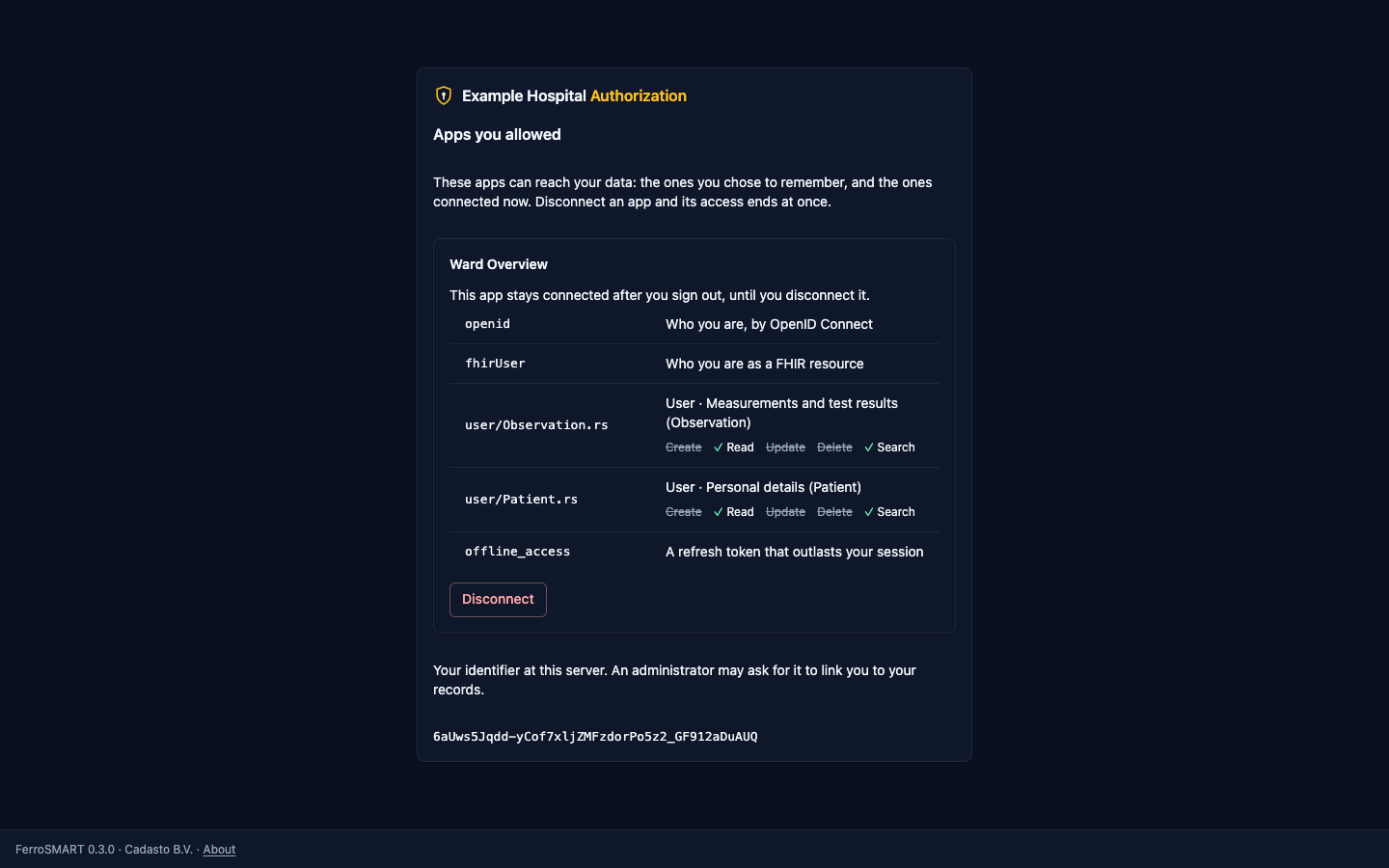
The consent and management pages read each scope in words, with plain words before the common FHIR resource types, such as “Measurements and test results (Observation)”.
Backend Services tokens live at most five minutes, whatever
access_token_lifetime says (SMART App Launch 2.2.0, Backend Services).
Backend Services has no person and no consent: the client’s ceiling is its pre-authorization (SMART App Launch 2.2.0, Backend Services).